I bought an M5Stack NFC unit (ST25R3916, I2C only, no interrupt pin on the Grove connector) and wanted to read and write NTAG215 tags from my Mac. One implementation would have taken an afternoon. I did four, because each one hit a different wall, and the walls were more interesting than the tags. The code is in m5nfc-st25r3916-experiments.
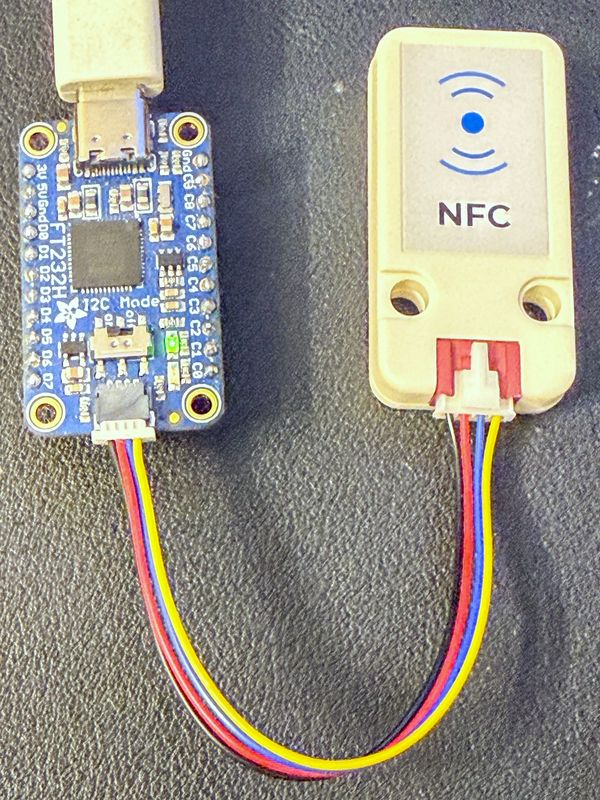
The unit on an Adafruit FT232H
Python on the Mac Link to heading
The first version used an FT232H breakout as an I2C adapter and pyftdi on the Mac. I wrote a fake chip for the tests, so I could develop most of the stack before touching a real tag.
Real silicon disagreed with the fake in two places. With receive CRC checking on, the chip validates CRC_A but leaves the two bytes in the FIFO, so every read came back two bytes long. And the 4-bit ACK a tag sends after a write trips the chip’s CRC and parity flags, so every successful write looked like a receive error. Both fixes were small once I knew what to look for.
The third problem showed up in a reliability run. The first 50-dump run gave 25 of 50, because a tag that is still selected ignores WUPA until the RF field is power-cycled. Now a select that gets no answer resets the field and retries once, and the run gives 50 of 50. A full 135-page dump takes about 7 seconds, which is all pyftdi overhead.
MicroPython as a USB card reader Link to heading
A reader that only works through a custom CLI is a bit sad when macOS already speaks PC/SC. So the next goal was to make a Feather RP2350 look like a standard CCID smart-card reader, with the unit on its Qwiic port.
CircuitPython can’t do this. It only exposes a fixed set of USB devices. MicroPython’s usb-device library lets you define a custom interface with bulk endpoints in Python, so I tried that, starting with a stub that only reported “slot present”. The question was whether macOS would accept a contactless-only device. It did: pyscard listed the reader straight away.
After that it was a port of the driver plus the CCID messages, with pseudo-APDUs for the tag: FF CA returns the UID, FF B0 reads pages, FF D6 writes a page. The reader also sends slot-change notifications, so PC/SC applications get live insert and remove events.
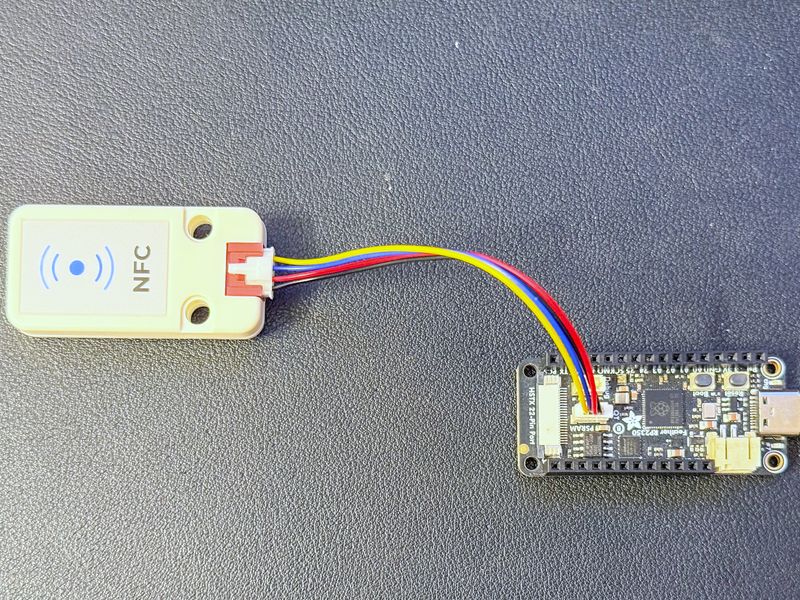
Feather RP2350 with the unit on the Qwiic port
Arduino: a TinyUSB class driver Link to heading
The same thing in C++ with Arduino-Pico was a different kind of problem. TinyUSB has no CCID class, so I wrote one and registered it through usbd_app_driver_get_cb(). The catch is timing. The core builds the USB configuration descriptor before setup() runs, so the CCID interface has to be registered in initVariant(). Register it in setup() and the Mac sees only the serial port, with no error anywhere.
The other trap was Wire1. On this Feather, Wire is I2C1 on the Qwiic pins and Wire1 is I2C0 on a pin that goes nowhere. Calling Wire1.setSDA(2) panics the board, and a hung board can’t take an automatic upload. It needs BOOTSEL held while you plug it in.
The payoff is speed. A full dump takes about 180 ms, against 7 seconds over the FT232H, and the firmware also exposes the same serial command line as the Python tool.
TinyGo Link to heading
The Go driver M5Unit-NFC-Go was my reference for the ST25R3916 init sequence, so a TinyGo version felt like the right fourth stack. The chip code is a direct port of the C++, with the same two silicon fixes.
The friction was in the tooling. TinyGo 0.41 refuses Go 1.27, so every command needs GOTOOLCHAIN=go1.26.0. There is no feather-rp2350 target, but pico2 runs on the same chip and I set the Qwiic pins in code. tinygo flash couldn’t reboot the board into its bootloader, so I copy the UF2 onto the RP2350 drive by hand.
The USB side turned out simpler than I expected. TinyGo exposes machine.ConfigureUSBEndpoint, and its mass-storage class shows the pattern: a CDC serial interface plus one more interface in a hand-built configuration descriptor. I copied that layout, put the CCID interface at interface 2 and did the NFC work in the main loop rather than in the USB interrupt. A full dump takes about 184 ms, and 50 of 50 cycles pass.
What I’d tell someone starting out Link to heading
The fake chip caught logic bugs and missed both hardware quirks, so I’d still write it, but I wouldn’t trust it past the first real tag. Writing the CCID layer as plain code with no USB or chip dependency paid off in all three firmware versions, because it ran in host tests every time. And the CCID gate test, a stub that does nothing but enumerate, saved me from building a reader that macOS would have ignored.
Limits worth knowing: only NTAG215 has been tested, and my ORCA card is DESFire, which needs an ISO-DEP layer I haven’t written. The TinyGo reader has no product string yet, so macOS lists it as 11914 10. I wrote much of the port with Claude Code, and the hardware runs are what told me whether it was right.